Crafting Lasting Impressions with Elegant Wedding Card Templates
Planning a wedding involves countless details, but few carry the same weight as the invitation. It is the first tangible hint of the event's style and tone, setting expectations for everything from the venue to the dress code. For designers, event planners, and creative couples, starting from scratch for every event can be time-consuming and stressful. This is where high-quality digital assets become indispensable. Having a versatile toolkit allows you to focus on personalization rather than structural design, ensuring that every couple receives a unique product that reflects their love story without requiring hours of repetitive labor.
Streamlining Your Design Workflow
Efficiency is the backbone of any successful creative business. When you have a tight deadline or multiple clients to manage, relying on robust Wedding Card Templates can drastically reduce your production time. This specific collection provides five distinct digital files, ensuring you have the right format for any stage of your design process. The package includes AI and EPS vector files, which are essential for professional printing because they can be scaled to any size without losing quality. This means whether you are printing a standard 5x7 invite or a large format poster for the reception entrance, the lines remain crisp and the typography sharp.
Alongside the vector formats, the inclusion of SVG, JPG, and PNG files offers immense flexibility. The SVG format is particularly useful for web-based previews or if you are using modern web-based design tools. Meanwhile, the high-resolution JPG and PNG files are perfect for immediate use in digital mockups or quick social media announcements. The canvas size of 1920px by 1280px provides a generous working area, giving you ample room to add photos, adjust layouts, or incorporate additional design elements without feeling cramped. This variety of file types ensures a smooth transition from the initial concept to the final delivery, whether that delivery is a printed physical item or a digital asset.
Beyond the Invitation: Versatile Applications
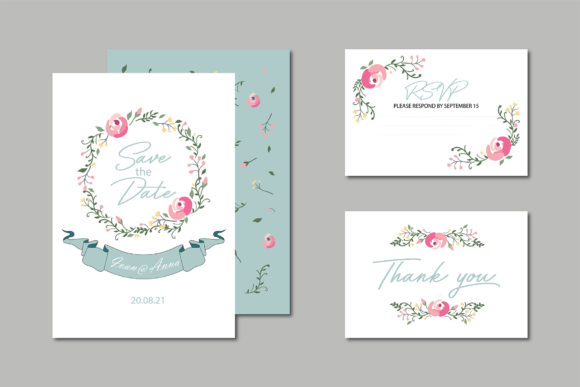
While the primary function of these assets is clear, their utility extends far beyond the initial "save the date" card. A cohesive visual identity is crucial for a wedding, and these templates can serve as the foundation for a wide range of design assets. Think about the entire ecosystem of a wedding stationery suite. You can use the base design to create matching RSVP cards, details cards for travel information, menu cards for the dinner tables, and even thank-you notes for after the event.
Furthermore, these files are not limited to paper goods. In the age of digital communication, couples often need social media graphics to share their journey. You can easily adapt the template styles to create Instagram stories, Facebook event covers, or digital save-the-dates that can be emailed to guests. For those in the packaging design space, the elegant motifs found in wedding designs are often repurposed for boutique product boxes, favor tags, or luxury branding materials. The versatility of the vector files allows you to extract specific elements—like a floral border or a decorative frame—and apply them to completely different projects, such as logo design for a bridal boutique or header graphics for a wedding planning blog.
Ensuring Visual Consistency and Brand Recognition
For creative professionals, consistency is the hallmark of quality. When you use a well-structured template, you are not just getting a pretty picture; you are getting a framework for modern typography and layout balance. These templates are designed with readability and hierarchy in mind, ensuring that the most important information—names, dates, and locations—stands out immediately. This attention to detail helps improve professional presentation, making your work appear more polished and trustworthy.
Using consistent brand identity elements across all wedding materials creates a seamless experience for the guests. It reinforces the theme of the event, whether it is rustic, minimalist, or ultra-glamorous. For designers, this consistency translates to higher client satisfaction and a stronger portfolio. When potential clients see that you can deliver a unified look across print and digital mediums, your perceived value increases. It shows that you understand the nuances of visual communication and can manage the aesthetic integrity of a project from start to finish.
Customization: Making the Template Your Own
The true power of a digital template lies in its editability. Because these files are provided in industry-standard formats like AI and EPS, you have complete control over every element. You are not locked into the original color palette or layout. If a client requests a specific shade of blush or wants to swap out a serif font for a sans serif font to match their modern venue, you can make those adjustments in minutes.
This level of customization is also vital for merchandise and editorial design. Imagine adapting the intricate borders of a wedding invite to create a pattern for custom tote bags or robes for the bridal party. Or perhaps you are a blogger looking to create a downloadable PDF guide for your readers; these templates can be restructured to create beautiful digital products like planners or checklists. The ability to manipulate the vector paths means you can truly make the design your own, ensuring that no two projects look exactly alike despite starting from the same source file.
Practical Tips for Typography and Pairing
When working with Wedding Card Templates, typography is often the element that requires the most finesse. A common pitfall is choosing fonts that are beautiful but illegible. While a flowing script font looks romantic, it can be difficult to read in long paragraphs or at small sizes. A practical approach is to use decorative scripts for headers or the couple's names, and pair them with a clean, legible serif font or sans serif font for the body text. This contrast creates visual interest while maintaining readability.
Don't be afraid to experiment with font pairing within the template structure. If the original design uses a heavy serif, try swapping it for a light sans-serif to change the mood from traditional to contemporary. Pay attention to kerning (the space between letters) and leading (the space between lines), as these subtle adjustments can drastically affect the overall feel of the invitation. Always print a test copy before finalizing; colors and spacing can look different on a screen compared to high-quality cardstock. By taking the time to review and refine the typography, you ensure that the final product is not only beautiful but also functional and easy for guests to read.